
Gaming chairs offer more than just a flamboyant appearance. While they are intentionally made to be sporty and flashy, most come with ergonomic features that support your back and promote good posture.
They include a backrest that extends beyond your head to support your entire back and lumbar support to align your lower spine properly. But that's not all. I go over every other necessary feature below, so read on to learn more.
Where Gaming Chairs Excel
Gaming chairs are excellent for your back and posture. Here's why:
#1. Tall Backrest
Gaming chairs stand out for their tall backrests, which give full support to the back, shoulders, neck, and head. That is a major difference from most ergonomic office chairs, which usually have a lower backrest.
This full-length support is especially useful for people with back pain because it helps support the entire spine and reduces pressure on the lower back. A well-designed gaming chair improves posture by keeping the shoulders, neck, and spine aligned, reduces pain by easing strain on the back, and makes long sitting sessions more comfortable.
#2. Superior Backrest Recline
Another reason gaming chairs can be good for your back is the recline system.
Even cheaper models usually let you lean back much farther than a standard office chair, often up to 135 degrees, while premium models can reach around 160 degrees. That extra range is not just for comfort. Reclining helps take pressure off the spine, especially after long periods of sitting.
A good recline-and-tilt mechanism also helps improve circulation and reduce back tension, making long gaming or work sessions less uncomfortable.
#3. Comfortable Neck Pillow
The neck pillow is another feature that helps gaming chairs support the upper body. While it is not as refined as the built-in support in some ergonomic office chairs, it can still reduce neck strain by supporting the natural curve and taking pressure off the cervical spine.
It also encourages better posture by helping keep the head and neck in a more neutral position, instead of leaning too far forward or backwards. The cushioning can also ease tension in the neck, shoulders, and upper back, which makes long sitting sessions more comfortable.
#4. Good Lumbar Support
Lumbar support is one of the main reasons a gaming chair can help your back. Your spine has a natural S-curve, and when you slump, the muscles that support that curve become less active. Good lumbar support helps maintain proper lower-back alignment and reduces strain while sitting.
Most gaming chairs include basic lumbar support, either built into the chair or added as a separate pillow. The advantage of an external lumbar pillow is that it can be removed and replaced, so you can upgrade to one that gives better support and comfort.
#5. Adjustable Armrests
Cheap desk chairs often have fixed or poorly placed armrests, which can force awkward posture and strain the elbows.
Gaming chairs usually do better here, with adjustable 3D or 4D armrests that support the elbows and forearms properly. That helps keep the shoulders relaxed, reduces neck and shoulder strain, and supports better posture.
Some even have a built-in footrest. This can be useful if your feet do not rest firmly on the floor. A footrest helps improve posture, reduces pressure on the lower back, supports circulation, and makes long sitting sessions more comfortable.
How to Properly Sit in a Game Chair?
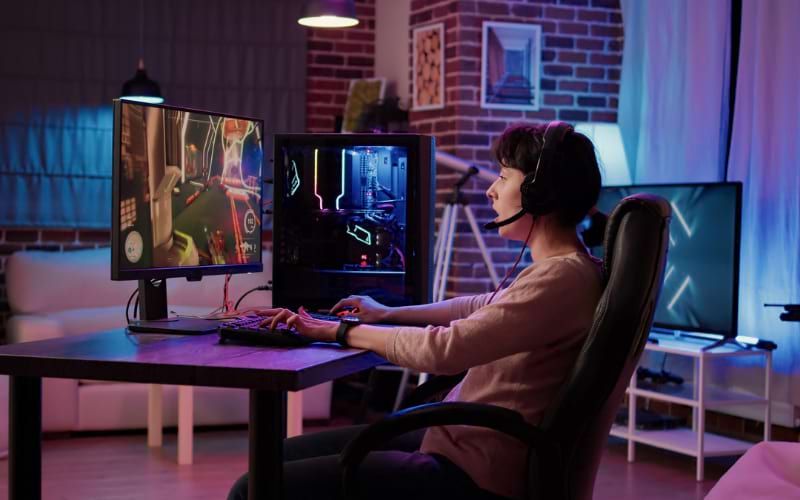
I wrote about maintaining the right sitting posture at a computer, and it's pretty much the same when settling into a gaming chair. There are just a handful of key points to keep in mind, and I'll run you through them right here.
- Sit with your back fully against the backrest and keep your spine in a natural position. Do not slump or overarch.
- Adjust the seat depth so there is a small gap between the seat edge and the back of your knees.
- Keep your feet flat on the floor or on a footrest, with your knees at a comfortable angle.
- Set the armrests so your arms rest naturally and your shoulders stay relaxed.
- Position your screen at eye level so your neck stays neutral.
- Use lumbar support and the neck pillow properly if your chair includes them.
- Get up regularly to stretch and move instead of staying seated too long.
Generally, a 100-110 degree recline angle and a lumbar support depth of 4 cm is ideal. I also recommend transitioning between reclined and upright positions to refine your posture, engage your core muscles, reduce muscle weariness, and bolster circulation.
Steps to Choose the Right Gaming Chair
Choose a gaming chair that gets the fundamentals right.
Focus on comfort, adjustability, and support first. Look for a chair with proper seat cushioning, adjustable height, armrests, and backrest, plus solid lumbar support for long sessions. Build quality matters too, so pay attention to durable materials, a stable base, and smooth-rolling casters.
Once that is covered, consider fit and finish. Pick a design that suits your space, check reviews for real-world feedback on comfort and durability, and avoid chairs that are difficult to assemble. Extra features can be a bonus, but they should never matter more than ergonomics and build quality.
Frequently Asked Questions (FAQs)
Here are some frequently asked questions on the use of gaming chairs for back and posture support.
Are gaming chairs better than office chairs for your back?
While gaming chairs offer a certain level of comfort and can be good for your back, ergonomic office chairs are designed specifically for prolonged sitting and back support. So, if optimal back care is your priority, ergonomic office chairs might be a better choice.
Is a gaming chair comfortable for long hours?
Yes, gaming chairs are designed to be comfortable for extended periods. They often come with plush padding, reclining features, and adjustable components, ensuring gamers remain comfy during long sessions. However, comfort can vary between brands and models.
How long do gaming chairs last?
The lifespan of a gaming chair depends on its build quality and usage. On average, a well-maintained, high-quality gaming chair can last anywhere from 3-5 years. Regular cleaning and avoiding overloading can extend its life.
 Darren Sherwood
Bottom Line
A gaming chair can offer support and features that a regular desk chair often lacks. While many people buy one for the look or comfort, the more important factor is how well it supports your back and posture.
The best choice is one that balances style with real ergonomic value. If it supports your spine properly and keeps you comfortable over long sessions, it is doing more than just looking good.









)